How sprite animation works (the two-frame trick)
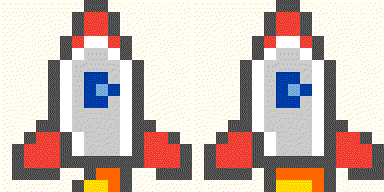
An animated sprite is a stack of grids, each the same size, shown one after the other. The classic arcade characters used two to four frames and swapped between them a few times a second. Two frames is enough for a surprising amount of life: a cat with its eyes open and its eyes shut is a blinking cat; a rocket with the flame tall and the flame short is a rocket that is thrusting; a campfire with the sparks up and the sparks down crackles.
The trick is that the second frame only changes a handful of cells. The rest of the sprite is identical, so your eye reads one object that moves rather than two pictures. That is also why animated pixel art files are tiny: a GIF only has to store what changed.
Every Color Pixels sprite has a second frame
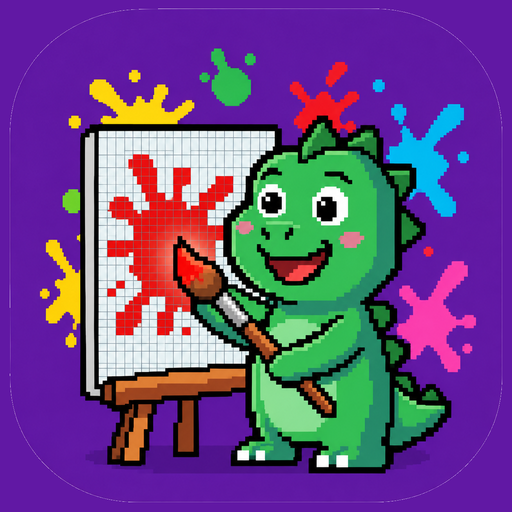
Every sprite in Color Pixels ships with an animation frame, and it is part of the reward, not a feature you buy. You paint the base frame cell by cell, like any color by number. When the last cell lands, the app plays the frames in a loop on the "All done" screen: the owl blinks, the toucan tilts its head, the arcade stick wiggles, Pinti the dinosaur dips the brush. It plays for everyone, free, with no ad in front of it.
Getting the GIF out
On the All done screen there are two buttons next to each other. Share sends a still PNG of your finished sprite with a short caption. Export GIF saves the loop as an animated GIF and opens your phone's share sheet, so it goes straight to WhatsApp, Messages, Instagram or your camera roll.
The GIF is built inside the app, offline, at a clean integer scale (a 16×16 sprite becomes 320×320 pixels, no blurring), and it is small: a 12×12 heart is about 2 KB, a 32×32 dragon under 100 KB. It loops forever and plays anywhere a GIF plays, which is everywhere.
Export is the one thing that is rewarded: watch a short video for it, or buy Remove ads once and export as often as you like. The animation itself is never behind either.
Your first pixel art GIF in five minutes
- Install Color Pixels free and open the First pixels pack.
- Paint the Heart (12×12, four colors). Drag across the red, let the palette move on, finish the black outline.
- Watch it beat on the All done screen.
- Tap Export GIF, then pick WhatsApp or Save to Photos in the share sheet. Done: a looping pixel heart, a couple of kilobytes, made by you.
The "Moving picture" achievement unlocks on your first export.
Get Color Pixels freeApp vs editor: which one do you actually need?
| Pixel art editor (Aseprite, Piskel, Pixel Studio) | Color Pixels | |
|---|---|---|
| What you do | Draw every pixel of every frame yourself | Color by number; the frames are drawn for you |
| Skill needed | Real pixel art skill, plus animation timing | None |
| Time to first GIF | Hours, honestly | Minutes |
| Result | Your own original character | A finished sprite you colored, animated, shareable |
| Best for | Making games and original art | Relaxing, sharing, collecting |
They are not rivals. Plenty of people use a color by number game to get a feel for how ramps, outlines and two-frame loops are built, then open an editor when they want to draw their own. Painting a hundred sprites by number teaches you more about pixel art than you would expect.
Why pixel art GIFs are perfect for sharing
- They are tiny. Kilobytes, not megabytes. They send instantly on mobile data and never get compressed into mush.
- They loop. A two-frame sprite reads as alive at any speed, and a loop has no awkward ending.
- They scale cleanly. Integer scaling keeps every pixel crisp, so the same GIF works as a sticker, a Reels clip or a wallpaper.
- They are yours. Every sprite in Color Pixels is original art made for the game, so there is no borrowed character in what you share.
Related reading
For the painting itself, start with pixel art color by number 101. If you are wondering why the export is rewarded and nothing else is, color by number without ads, lives or energy lays out the whole model. And if you were about to print a pixel grid instead, pixel art coloring pages: print or app? compares the two.
Quick questions
How do I make an animated pixel art GIF?
In an editor you draw every frame yourself. In Color Pixels you color a sprite by number, it animates when the last cell is filled, and Export GIF saves the loop as a small animated GIF straight to your share sheet.
Is the animation free in Color Pixels?
Yes. Every finished sprite animates on the All done screen for everyone, with no ad in front of it. Only saving it as a GIF is rewarded: watch a short video, or buy Remove ads once for unlimited exports.
How big are the GIFs?
A few kilobytes for a 16×16, under 100 KB for a 32×32. They are scaled by whole numbers so pixels stay crisp, and they loop forever.